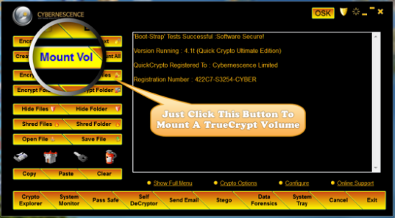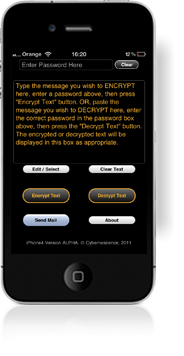
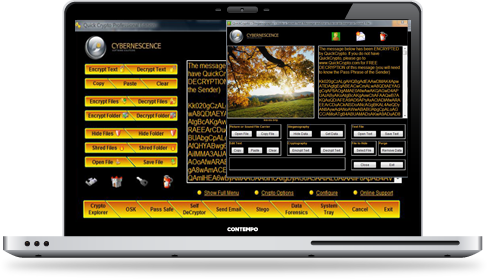







QuickCrypto is encryption software that will hide and encrypt files, email, passwords and hide secret text or files in pictures.

QuickCrypto also recovers or prevents recovery of deleted files and will analyze and securely remove internet browsing traces.


Advanced Windows based Privacy and Encryption software.
Using the most powerful algorithms and techniques to ensure your email communication and confidential information is kept secure.

Whether they prove to be
Friend or Foe ?


Keep everyone completely locked out of your email communication and confidential data files, until YOU say it's OK!

Everyone is monitoring your email. Think not? But they are! Both UK and US governments record every email that is sent across the internet. Western governments publish this info, other governments may not (but undoubtedly do try).

Not worried that anyone connected to the government can read your email (without a warrant or court order)? Well, what about the 'bad guys'? Constant press reports contain ever increasing amounts of identity internet fraud. Keep your personal and company email details safe in transit.

The Password Safe can store all of your online passwords in one secure place. Because it's easy to retrieve and use the login IDs and passwords that are needed to enter secure online sites, you'll be more likely to use different passwords for each site, making your Internet surfing more safe and secure.

The random password generator creates long, unusual, non-intuitive passwords which are next to impossible for the bad guys to discover and as the Password Safe is fully integrated with the file and email encryption/decryption operation, this allows the complex un-guessable passwords to also secure files and email.

QuickCrypto file encryption prevents anyone using a file, seeing what it contains or even understanding what type of file it is (filenames can be changed when encrypting, but the original filename can be restored on decryption if required).

Not all encryption software products are useful or safe. It is relatively easy to make files look like secure encryption has taken place, when in fact, this is not so. QuickCrypto provides "test vector" facilities to prove to you and experts that advanced encryption methods have been implemented correctly.

Have you confidential or inappropriate files on your system only you need to be aware of?

Then don't rely on simple attribute hiding type techniques or just hope that no one will find these. Using QuickCrypto you can quickly and easily remove the files from the normal file system so that they do not appear on the system to any normal software.

Still worried they might be found under intense expert or hacker type scrutiny? Then encrypt the files before they are hidden for total security.

Information sent across the internet can be secured with encryption. But do you even want anyone to know you are sending important information? If no one even knows there is confidential information being sent or stored, it's unlikely anyone will even try to intercept and try and crack the message.

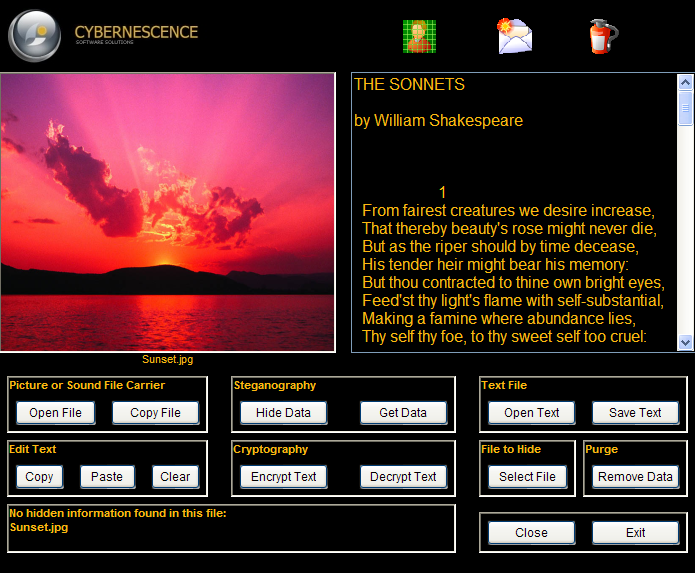
Encode (hide) text messages and/or files (either can be encrypted first) within a picture image using QuickCrypto. Only other QuickCrypto users who are expecting a secret message or file can access it. Every one else will just see an ordinary picture.

Internet browsers are fantastic, but they can leave an awful lot of information behind. Surprises can be hard to keep once your teenager has spotted which sites you have visited near Christmas or Birthday times!

Windows retains audit files that aren't deleted as you would think. Deleting files doesn't erase the digital information - use QuickCrypto to recover deleted files and see for yourself! Only securely shredded/wiped files can be considered to be gone for good and this QuickCrypto allows you to do in numerous ways.

If you have a Windows based PC or system, download now and explore all the amazing features of QuickCrypto.

Use the fully functioning product free for 15 days then finish with a risk free purchase - your payment will be returned if within 30 days you are not satisfied.

... "Wow, thanks for the super fast response." ... "We are a community group and find the program to be just what we need" ... "Thank you very much indeed for persevering with contacting me and for your most generous offer; I intend to recommend your product to our Photographic Society" ...


Powerful, Easy, Privacy & Encryption Software for Windows


Software for Encrypting and Decrypting Files 
This software is usually only available via download. This significantly reduces the trees or oil resources used for packaging.
 
If you require a packaged CD as illustrated, please drop us an email and we will manufacture these as and if required, however we will have to charge extra for this service.

The software you can download now (within a few minutes by clicking the above button) is exactly the same as any provided on CD.

Encrypt Files, Folders, Sub Folders


Any type of file can be encrypted using industry standard encryption algorithms, choose from AES, Blowfish or Triple DES.

Large files are encrypted blazingly quickly.

The entire contents of a folder can be encrypted with a few clicks.

Using the CryptoExplorer all files within folders and sub folders can be encrypted quickly and easily.

Use the Crypto Explorer or fast file or folder encryption buttons or just 'right-click' in Windows Explorer and choose 'Encrypt' or 'Decrypt'!
 

Hide Files, Files become 'Invisible' to Windows Explorer


Any type of file can be hidden. Hidden files cannot be found by normal Windows software, e.g. Windows Explorer.

This is not simple file attribute changing, the files are removed from the usual file system and only the built-in CryptoExplorer can 'see' the hidden files.

All files in a folder can be quickly hidden or un-hidden. Encrypted or unencrypted files can be hidden and unhidden equally easily. The viewing of hidden files can be password protected.

Files can be hidden in folders alongside unhidden files. A folder may look completely innocent of confidential files but actually contain hundreds of hidden encrypted and unencrypted files as desired.
 

Encrypt Email Text and Attachments


Simply, easily and securely encrypt email messages. Type in an email message to QuickCrypto, encrypt with a pass phrase and then click 'Send Email'.

It is that straight forward to ensure non of your email messages can be read by anyone else other than the recipient who must know the agreed pass phrase. Keep a different pass phrase (extended password) for every person in the integrated password safe.

If you receive a QuickCrypto encrypted email, simply click the message, enter the correct pass phrase and the message will be automatically decrypted and revealed.
 

Hide Text and Files in Photographs, Pictures


Conceal encrypted or unencrypted secret text messages in photographs or pictures (use any gif, jpg or bmp image file as the source file to hide text and files within). Any kind of file can also be hidden in a photograph.

The picture will look exactly the same to the human eye once files and/or text are hidden within, but they can be revealed and recovered by QuickCrypto.
 

Secure All Website and Encryption Passwords and PINs


The integrated encrypted Password Safe will keep all of your Passwords, Personal Identification Numbers (PINs) and Pass Phrases secure.

Logging in to online password protected sites is made easier as QuickCrypto will auto load the correct web page associated with the password from the Password Safe, then enabling quick 'copy and paste' transfer of login and password details into the site.

You only have to remember one password to 'remember' them all! Or if you wish, use a 'key file' instead - a USB thumb drive can be used as an encryption key to open up the Password Safe.
 

Find and Recover Deleted Files


QuickCrypto will search all or selected hard drives for deleted files. These are files that have been removed from the recycle bin or those that have not been securely deleted by QuickCrypto.

Files that have been deleted by mistake can often be fully recovered. Deleted files will be analyzed and recovery can be attempted. Works with NTFS or FAT file systems.
 

Prevent Recovery of Confidential Already Deleted Files


QuickCrypto will search all or selected hard drives for deleted files - files that have not been securely erased (digitally shredded) by using QuickCrypto to remove them from the system.

Confidential files should not be left in this state as recovery software is commonly used to retrieve deleted files.

QuickCrypto will analyze and list deleted files, these can be then be shredded in their deleted state (including the removal of the file names themselves) individually or all together. Any type of file recovery is then prevented. Works with NTFS or FAT file systems.
 

Erase, Wipe, Shred, Permanently Delete Files (DoD Standard)


Department of Defense Standard secure erasing (digitally shredding) of files is provided.

Deleting a file does not remove the file data from the system. The deleted file remains on the disk until another file is created over it, but even after that, whenever that might or might not happen, it still could be possible to recover some or all of the data by using special techniques.

QuickCrypto provides a digital file "shredder" or "eraser wiper" that securely removes the file by overwriting the file data on disk prior to deleting the file.
 

US Government, and Commercial, Encryption Standards


Includes Advanced Encryption Standard (AES), Blowfish or Triple DES Encryption provided. Don't be taken in by 'snake-oil' claims from vendors providing home-brew encryption. Use peer-reviewed security algorithms implemented within software by experts.
 

Self Decrypting Email Messages


A self decrypting message can be created where you require a message to be able to be decrypted (using the Pass Phrase) without the message recipient having QuickCrypto on their system.

QuickCrypto will also provide an option to "Zip" (compress) the self-decrypting message application.

To decrypt a received self-decrypting message simply 'double-click' on the message file and it will automatically decrypt (once the correct Pass Phrase is entered).
 

Cryptographically Secure Random Password Generator


The password generator can be called for many purposes and long random passwords saved for web sites, encrypted emails, file encryption etc.

The integrated random number generator used in the QuickCrypto password generator conforms to the NIST Special Publication 800-90 Recommendation for Random Number Generation Using Deterministic Random Bit Generators [SP80090], first published June 2006. Entropy is accumulated in "Fortuna" pools as described in Ferguson and Schneier, Practical Cryptography.
 

Automatic File Compression alongside File Encryption


Compressing (often known as 'zipping') data before encryption not only makes for smaller encrypted files and shorter messages to be stored or transmitted, but also greatly improves security by reducing the 'plaintext redundancy' and thus making cryptanalysis (the cracking of encryption) much more difficult.
 

Advanced Digital Data Forensics (Professional Edition)


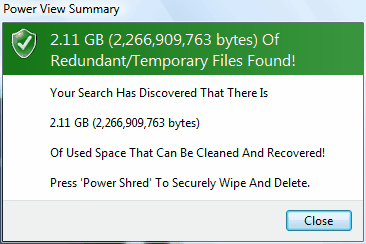
View and then Shred if required (Permanently Remove): Web History, Cookies, Index.dat for Internet Explorer and Firefox.

Also view and erase: recycle bin files, free space, temporary files, temporary internet files, page files, recent files, deleted files (including 'slack space' and file names). Export all found file lists to csv files. Search through all found data.

Recover deleted files (not those shredded by QuickCrypto - these are unrecoverable). Prevent recovery of *already* normally deleted files by shredding after normal Windows delete operation (this includes removal of filenames).
 

Powerful CryptoExplorer™ Functionality


Using the CryptoExplorer selected files or all files within folders and optionally sub folders, can be encrypted, decrypted, shredded, hidden, unhidden, securely moved, copied, compressed, quickly and easily.

Files can be encrypted and decrypted by 'dragging and dropping' across panes, securely moved across folders and drives. Encrypted files can have their file names obscured (renamed) but on decryption the original file name will be restored ...

A powerhouse of security and privacy for file manipulation!
 

Personalize and apply Own Branding if required


QuickCrypto comes ready installed with a high-tech pleasing interface, but this can easily be changed to reflect personal color, sound effects and branding preferences when required.
 

Ideal for Home or Office Use


QuickCrypto combines a very easy, intuitive method of operation with powerful, state of the art encryption and file system manipulation to give the home or office unrivalled data protection and privacy.


Advanced Encryption & Privacy Windows-Based Software for Windows 2000/XP/Vista / 7

QuickCrypto Email, File & Password Encryption System QuickCrypto Email, File & Password Encryption System

QuickCrypto Email, File & Password Encryption System QuickCrypto Email, File & Password Encryption System


Do you have question, a suggestion or some feedback?
 We'd love to hear from you!
 Please use the form to contact us.


Name:

Email:

Message:


Type the code below here:


Encrypt Text With AES Using Your Browser

QuickCrypto Advanced Privacy & Encryption Windows-Based Software


(c) 2007 - 2010 Cybernescence Limited  Privacy Policy Site Map

Cybernescence Limited is a company registered in England & Wales with company number 06971223
 Suite 523, 6 Slington House, Rankine Road, Basingstoke, RG24 8PH, UNITED KINGDOM.
 Tel (USA):  (815) 301-8403    Fax (USA):  (815) 301-8403 

To translate this page, select another language from below: